Sg2.9
Grid Generator
Recent RSS
Creator:  Shanfan Huang
Date:  4. January 2012, 11:04

This is a very straight forward tool that generates four kinds of grid. You type in the number of rows and columns, and the size of the unit, then click a button.
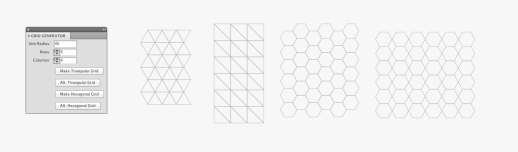
While those grids might seem basic to mathematicians, I thought it'd be handy to have something like this in AI for graphic artists. Something looking basic at first can be creatively altered and became something interesting. I attached two quick-dirty mockups just to demonstrate some possibilities.
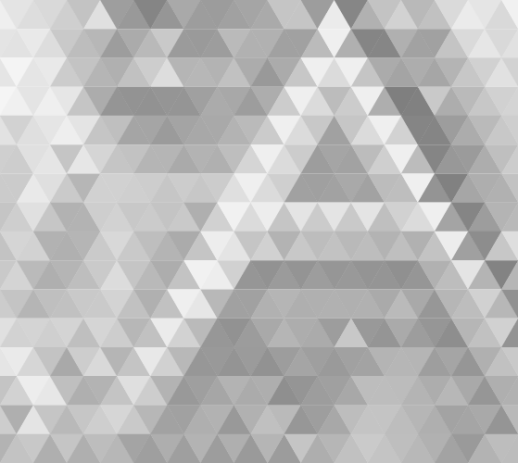
My favorite trick is to use the raster.getAverageColor() function to layout a rich and abstract color combination. If you feel like to try, copy the code below to the end of my scripts:

  • -----------------------------------

// Pickup colors from a raster//
//NOTE: An image must be placed within the artboard and rasterized//

var rasters = document.getItems({
type: Raster,
selected: true
});

var paths = document.getItems({
type: Path,
selected: true
});

if(rasters.length >0 && paths.length >0){
var raster = rasters[0];
for(var i=0; i<paths.length; i++) {
var path = paths[i];
var color = raster.getAverageColor(path);
path.fillColor = color;
}
}else{
Dialog.alert('Please select at least one rasterized image and one path overlapping on top.');
}

  • -------------------------------------------

UPDATE: 01/10/2012
I uploaded the above lines as a separate script.

Re: Grid Generator
From:  dB
Date:  3. February 2012, 11:39

How do you make the grid format on your second example. Is it a combination of two grid types? Could you post a short guide for this. Many thanks.

Re: Grid Generator
From:  Rian
Date:  5. February 2012, 13:03

Love this script! I second that...how did you create the second example. Sems like you've duplicated the grid and rotated it? Can you explain how you created this one? Cheers.

Re: Grid Generator
From:  Shanfan Huang
Date:  5. February 2012, 20:22

Yep, it's actually two layers overlapping (ha! cheater!)

Duplicate the first layer and shrink the it to 86.6% of the size, then rotate and match. That's the second example :)

Re: Grid Generator
From:  Rian
Date:  6. February 2012, 13:39

Haha, that's not cheating, that's just clever!
Very cool..Cheers!

I've just started getting a strange thing going on here...is it to do with the paths I have? This shape just fills with a single colour when I run the raster color script ...never happened before, any thoughts?

Re: Grid Generator
From:  Shanfan Huang
Date:  6. February 2012, 16:27

Did you rasterize the image?
If you did, maybe try it with a more colorful image, see if it's because your original image is too monochrome?

Re: Grid Generator
From:  Rian
Date:  8. February 2012, 17:43

Hi Shafan,

I tried that with a few different images. Tried saving as jpeg through photoshop and also rasterising directly in illustrator but I'm still getting the same result.
It's strange that it appears to be removing a few of the central path lines and using the over all shape to generate an average colour from the raster image instead of 'seeing' all the path lines :/

Re: Grid Generator
From:  Shanfan Huang
Date:  8. February 2012, 19:16

Can you upload the .ai file here?
If the file is too big to upload, try excluding the bitmap image. I just want to see your vector shapes.

Re: Grid Generator
From:  Rian
Date:  14. February 2012, 21:37

Shanfan,

Here you go...can't seem to upload the .ai file here but have attached a link to it:

https://panmind.com/s/iFxvkITPZofUr81tDmLVGe5n0RXKYwSH

I'm pretty sure it's because of how I've created this shape, but I really dont know the best way to create this so the script works along with it.
I tried expanding the paths and using different pathfinder options but then, obviously it creates colours within the stroke area, not the shape outlined by them, if that makes sense (probably not haha) but sure see what you think.

cheers.

Re: Grid Generator
From:  Shanfan Huang
Date:  14. February 2012, 22:46

Ok. It's because you've overlapped these paths all together with the centers aligned.

When you run the coloring script, what happened is that, all the paths are colored with the color taken from their centers - which is the same in your arrangement.

I used Pathfinders > Divide, to break apart all your shapes, then run the coloring script on this image. Is this the outcome you want?

A good piece of advice is that before you let the scripts do the hard work for you, you'd better first try to understand how it works. Don't just sit there wait for the magic. Maybe try hand color it and see if it is what you want. Simply like this:

If you can't figure out how to manually do it, then probably the script can't do it either.

Re: Grid Generator
From:  Rian
Date:  18. February 2012, 16:09

Shanfan...you are what is commonly referred to as 'a legend!'

Aye I figured it was the construction of the paths but wasn't sure how to get it to read all the shapes individually but as one unit. The top example is exactly what I was looking to get.

So when creating a pretty complex shape that consists of a lot of numerous paths that intersect...using the divide pathfinder is the way to go? I just had trouble figuring it out as after running the grid generator there was no need to apply any pathfinder options (and assumed you could just draw paths)...i assume that's built into the grid generator script or are grids different?

Any thanks so so much for taking the time and effort to help!!

Scripts
08.08.14, 15:24
15.05.14, 14:23
02.03.14, 19:16
18.11.13, 14:48
22.03.13, 03:05
22.02.13, 15:45
Posts
10.01.17, 16:37
19.02.16, 06:03
19.02.16, 06:00
17.01.16, 11:00
12.01.16, 13:10
25.11.15, 08:19