Sg2.9
Grid Generator
Recent RSS
Creator:  Shanfan Huang
Date:  4. January 2012, 11:04

This is a very straight forward tool that generates four kinds of grid. You type in the number of rows and columns, and the size of the unit, then click a button.
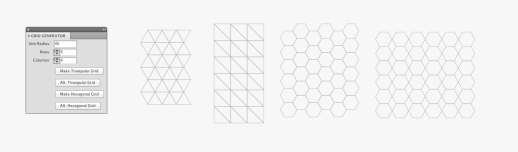
While those grids might seem basic to mathematicians, I thought it'd be handy to have something like this in AI for graphic artists. Something looking basic at first can be creatively altered and became something interesting. I attached two quick-dirty mockups just to demonstrate some possibilities.

My favorite trick is to use the raster.getAverageColor() function to layout a rich and abstract color combination. If you feel like to try, copy the code below to the end of my scripts:

  • -----------------------------------

// Pickup colors from a raster//
//NOTE: An image must be placed within the artboard and rasterized//

var rasters = document.getItems({
type: Raster,
selected: true
});

var paths = document.getItems({
type: Path,
selected: true
});

if(rasters.length >0 && paths.length >0){
var raster = rasters[0];
for(var i=0; i<paths.length; i++) {
var path = paths[i];
var color = raster.getAverageColor(path);
path.fillColor = color;
}
}else{
Dialog.alert('Please select at least one rasterized image and one path overlapping on top.');
}

  • -------------------------------------------

UPDATE: 01/10/2012
I uploaded the above lines as a separate script.

Re: Grid Generator
From:  Rian
Date:  27. April 2012, 17:06

Have you tried rasterizing the image in illustrator?

Object > Rasterize

That works for me...and just make sure your raster image is below your path in the layer stack. Hope that helps.

Re: Grid Generator
From:  delfe
Date:  12. June 2012, 17:34

Nothing happen when I click on the several button? do I have to use the pentool or to make a shape at the beginning?

Thanks for your help,
Delfe

Re: Grid Generator
From:  Delfe
Date:  12. June 2012, 18:30

It's ok!! Thanks

Re: Grid Generator
Date:  20. August 2012, 00:04

I thought this was very useful and I have amended it to make it easier to add new patterns -- and I have added some new ones.
... and a few options such as inverting alternate rows.
Maybe more later :-)
As well as the raster function, it goes well with Variator and ThemeColours scripts

Re: Grid Generator
From:  Ted
Date:  11. September 2012, 09:58

I dont know how to fill color to this work, plz show me how ... thank so much !!

Re: Grid Generator
Date:  12. September 2012, 00:01

Treat it like any other set of shapes - to get random colours, use the ThemeColours, or the Variator script
OR, with this script,
create a raster from an image, align with the generated patter, select the raster and the generated shape - then click the Raster button.

Re: Grid Generator
Date:  26. September 2012, 22:56

I did not want to write code to describe a jigsaw puzzle in the pattern generator, so I drew one normally then captured the code using getPathScript.
( I also modifed the Scriptographer module console.js to increase the size of the log available to write the result **while (consoleText.length() >= bignumber** )

I edited that into the pattern generator script as a pattern called Capture1.
I also added a 'draw alternate shapes' function - for some shapes this draws only half the shapes, leaving 'holes' - useful when there is an attractive background.

Example jigsaw ( using a raster of yellow flowers ) and an alternating pattern over a radial background.

Re: Grid Generator
From:  lovevhs
Date:  16. June 2013, 09:18

I can not understand the getpathscript ,how it work?

Re: Grid Generator
Date:  16. June 2013, 10:37

select a path
run the script

the code to draw the path will be written to the log

you can then copy that into other scripts

Re: Grid Generator
From:  Jess
Date:  3. July 2013, 16:57

I can't make it work!

Keep getting the error message and I quote the fellow Delfe: " do I have to use the pentool or to make a shape at the beginning?"

Please, someone help me! )):

Scripts
08.08.14, 15:24
15.05.14, 14:23
02.03.14, 19:16
18.11.13, 14:48
22.03.13, 03:05
22.02.13, 15:45
Posts
10.01.17, 16:37
19.02.16, 06:03
19.02.16, 06:00
17.01.16, 11:00
12.01.16, 13:10
25.11.15, 08:19