
Sg2.8
cube / cylinder
Recent RSS
Creator:  Hiroyuki Sato
Date:  23. November 2006, 14:02

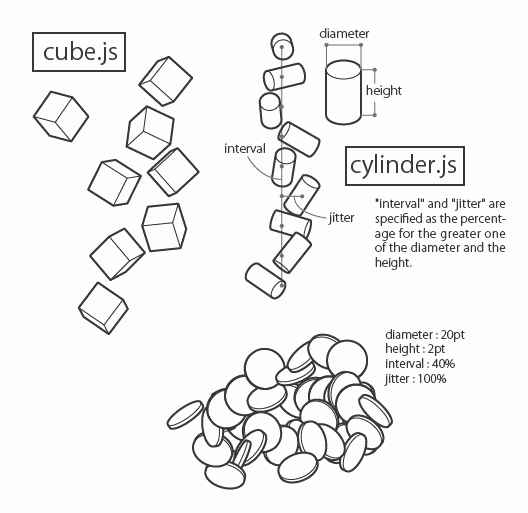
These 2 scripts scatter primitive solids by dragging.
cube.js for cubes.
cylinder.js for cylinders.

2008-03-27: modified for Sg 2.0.025
2008-04-01: minor fix on dialog function
2009-?-? official staff modified to work with Sg 2.5. Thanks!
2010-02-21 added some function for the dialog. modified cube.js to work with Sg 2.6
2010-04-18 modified dialog part to use palette class for Sg 2.7

  • - interval and jitter option values now retrieved from the palette as point value, not percent.
Re: ReferenceError:
From:  Transformers
Date:  2. April 2007, 09:18

wow ... its really cool

help
From:  Gio
Date:  20. April 2007, 21:42

i discover scriptographer recently & i downloaded cube and cylinder.js and copied them in script folder but i dont understand how to use them....
sorry for my poor english and ave a good day
G

Re: help
From:  dave
Date:  5. November 2007, 15:44

cant find where to set the interval and diameter parameters

Re: help
From:  sym
Date:  25. March 2008, 19:29

Thanks for this wonderfull script, it was amazinnnnnnng!! but I cant find where to set the interval and diameter parameters on this plug, can you help me??

Re: help
From:  Maria prabudass
Date:  26. March 2008, 08:40

Hi,

I have developed javascript for illustrator cs for windows. I developed plugin also but i dont know how to call my javascript in c++. Could you please give samples and help me.

Thanks,
Maria Prabudass E

option dialog issue
From:  Hiroyuki Sato
Date:  26. March 2008, 11:31

Sorry for long absence.
Dialog.prompt in these scripts didn't work with the latest version of Sg.
I tried fixing these to work with the latest ver. And I replaced the uploaded scripts.
Only the dialog part fix. But it seems to work. How about this?

Re: option dialog issue
From:  Ron Horsley
Date:  10. October 2008, 21:20

Using Illustrator CS3 with latest version of Spirographer for Mac. When click on Cube or Cylinder and hit Play button, nothing happens. Am I missing a step or is there some issue with this latest configuration?

Instructions
From:  Arthur
Date:  7. April 2009, 22:03

1. Put the script inside the "scripts" folder
2. Click on the script either cube.js or cylinder.js
3. In the scriptographer main window press the "/ /" button
4. Select the "/ /' tool in toolbar
5. Make a line

Scripts
23.07.10, 01:02
08.06.10, 20:05
08.05.10, 12:28
18.04.10, 06:57
29.03.10, 18:20
29.03.10, 15:32
Posts
28.07.10, 21:50
26.07.10, 22:15
24.07.10, 20:28
24.07.10, 17:33
23.07.10, 23:14
22.07.10, 17:01
Donation

If you use Scriptographer regularly or for commercial purposes, please consider making a donation via PayPal:

Thank you!