
Sg2.8
Text Pencil
Recent RSS
Creator:  Jonathan Puckey
Date:  11. August 2006, 00:00

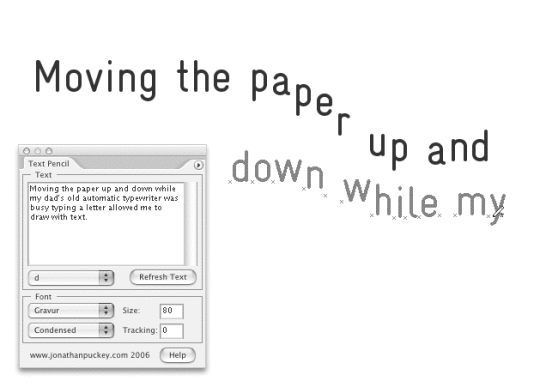
Text Pencil lets you draw with text.

Note: To use Text Pencil you will need to download and install the latest version of Scriptographer (2.8.050 or above)

I used an earlier version of Text Pencil to create a poster

New features in v1.5:
• Allows the use of non monospaced fonts
• Draw with words
• Perfect spacing (turn it off for less perfect spacing)
• Select the position in the text with a popup list.

Please post any bugs you find in the comments

Re: Text Pencil updated for Scripto 2.0.024
From:  Max
Date:  16. July 2008, 17:35

I like very much your works.
I saw on your site the fantastic tools LETTERING TOOL and DELAUNAY RASTER... do you think to upload the scripts for the Scriptographer users?

THANKS!!!

Re: Text Pencil updated for Scripto 2.0.024
From:  D_Anna
Date:  10. October 2008, 10:19

Hi guys!!!

Does anybody know, is it possible to use Cyrillic typefaces (or any others but Latin) with this script?

Thankssss!!!!

Text Pencil updated
Date:  3. June 2010, 23:23

Updated Text Pencil for the latest version of Scriptographer (saving a hell of a lot of code thanks to the new Palette functionality)

Refresh Text Button oversized
From:  Orhan
Date:  13. June 2010, 11:35

Hi, I can't change the font size and tracking because of the oversized-looking 'refresh text' button. Of course there are ways to work around this problem, but I just wanted to you know. Is it possible to change the default font, font size and tracking values by editing the code?
Thanks for the script.

Update
Date:  13. June 2010, 16:40

You should download this script again as it seems like you are running an old version.

Make sure you also have the latest Scriptographer version.

Re: Refresh Text Button oversized
From:  Jürg Lehni
Date:  16. June 2010, 12:22

Yes, this looks like an issue that was already resolved in the last release of the plugin (2.8.052). Before replacing the script with the new version, I am curious to find out if the latest release of the plugin resolves this issue for you.

Refresh Text Button oversized (Solved)
From:  Orhan
Date:  17. June 2010, 10:55

Yes, apparently I was using the older version of the script as you've pointed out. I downloaded the new version. Now everything works fine. Thanks a lot.

Scripts
23.07.10, 01:02
08.06.10, 20:05
08.05.10, 12:28
18.04.10, 06:57
29.03.10, 18:20
29.03.10, 15:32
Posts
28.07.10, 21:50
26.07.10, 22:15
24.07.10, 20:28
24.07.10, 17:33
23.07.10, 23:14
22.07.10, 17:01
Donation

If you use Scriptographer regularly or for commercial purposes, please consider making a donation via PayPal:

Thank you!