Sg2.8
Color Raster
Recent RSS
Creator:  Jürg Lehni
Date:  28. June 2006, 02:08

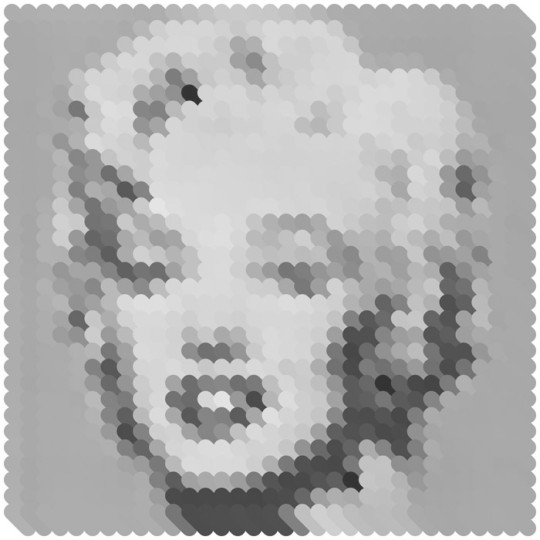
The Color Raster changes the color of a given graphic object according to the pixel values of a raster image.

Trouble
From:  Niko
Date:  18. March 2007, 13:34

I've really got trouble with this one. It doesn't matter what I try I only get the message "ReferenceError: "Grayscale" is not defined. at /rasters/color raster.js:46"

Perhaps someone can help me.

thx

Re: Trouble
From:  Jürg Lehni
Date:  18. March 2007, 13:49

If you download the new version 2.0.022, does this still occur?

Re: Trouble
From:  Niko
Date:  18. March 2007, 19:31

yes I've got the newest version. I tried it on Mac OS 10.4.9 and PC (Illustrator CS2) with the newest Java Runtime Environment.

Re: Trouble
From:  fghfg
Date:  20. April 2007, 16:42

dfhg

Re: Trouble
From:  martin
Date:  25. June 2008, 23:51

still problem, any solutions?

Re: Trouble
Date:  27. June 2008, 23:29

change Grayscale to GrayColor

Re: Trouble
From:  TAN
Date:  2. October 2008, 16:47

same problem for me!!!

and mikeb, what do you mean by change grayscale to gray color?

change the actual script it self?

Re: Trouble
From:  Hans
Date:  23. November 2008, 15:55

Hi,

I think these scripts are great, but I haven't really been able to get (manageable) consistent results. Usually the output is huuuge, and the result is more like a pixelized version of the raster.

Any help to get something like the Marilyn Monroe above? Nice, visible circles. What dimensions should the original file have and what should I set as grid size?

Thanks a lot!

Hans

how to use
From:  abstrato
Date:  9. April 2009, 08:58

Hi,

First let me thank you for this amazing tool that is Scriptographer.

I'm using Scriptographer under Windows Vista / Illustrator CS4. Almost everything works fine.

But I have a doubt: how can I work with Color Raster? I've tryed several ways and nothing happened. Really nothing. Does it works on CS4? Or does it demands a special procedure?

Thanks

Abstrato.

Re: how to use
From:  Abdullah
Date:  21. October 2009, 10:00

Here's how it worked for me (CS4).
Make sure your image is really small.
In the 70 x 70 pixel range.
Save for the web as GIF and knock it down to say ± 16 colors.
Then open it in PSD again and save it as JPG.
Draw a tube like te Monroe example with the L and M tools.
Pathfinder those two together to make the tube.

Select both and press play.
I selected a size 10 in the option menu.

Scripts
23.07.10, 01:02
08.06.10, 20:05
08.05.10, 12:28
18.04.10, 06:57
29.03.10, 18:20
29.03.10, 15:32
Posts
28.07.10, 21:50
26.07.10, 22:15
24.07.10, 20:28
24.07.10, 17:33
23.07.10, 23:14
22.07.10, 17:01
Donation

If you use Scriptographer regularly or for commercial purposes, please consider making a donation via PayPal:

Thank you!