Creator:  Shanfan Huang
Date:  4. January 2012, 11:04

This is a very straight forward tool that generates four kinds of grid. You type in the number of rows and columns, and the size of the unit, then click a button.
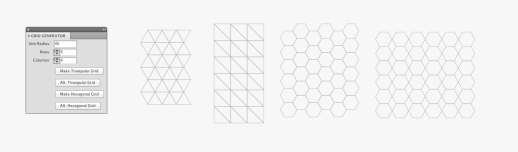
While those grids might seem basic to mathematicians, I thought it'd be handy to have something like this in AI for graphic artists. Something looking basic at first can be creatively altered and became something interesting. I attached two quick-dirty mockups just to demonstrate some possibilities.
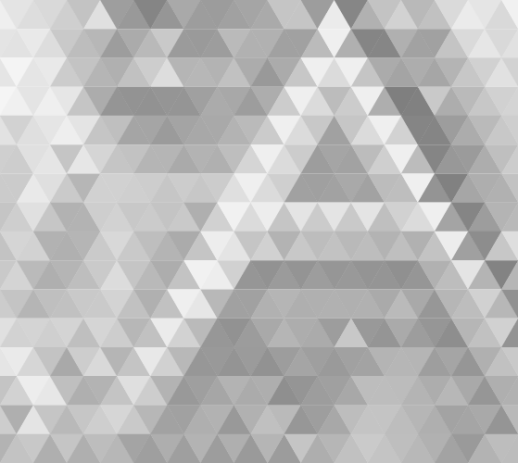
My favorite trick is to use the raster.getAverageColor() function to layout a rich and abstract color combination. If you feel like to try, copy the code below to the end of my scripts:

  • -----------------------------------

// Pickup colors from a raster//
//NOTE: An image must be placed within the artboard and rasterized//

var rasters = document.getItems({
type: Raster,
selected: true
});

var paths = document.getItems({
type: Path,
selected: true
});

if(rasters.length >0 && paths.length >0){
var raster = rasters[0];
for(var i=0; i<paths.length; i++) {
var path = paths[i];
var color = raster.getAverageColor(path);
path.fillColor = color;
}
}else{
Dialog.alert('Please select at least one rasterized image and one path overlapping on top.');
}

  • -------------------------------------------

UPDATE: 01/10/2012
I uploaded the above lines as a separate script.

Re: Grid Generator
From:  mechatronic
Date:  9. January 2012, 14:42

Hi, love what your doing here, but can't get it to work. Plz help. Screen grab attached.

Re: Grid Generator
From:  Shanfan Huang
Date:  10. January 2012, 06:48

Sorry I couldn't see any screenshot. can you re-upload it?

Re: Grid Generator
From:  mechatronic
Date:  10. January 2012, 11:02

Hi, it's seems to working well now :) Thanks!
Just can't get the average colour script part to work.

Re: Grid Generator
From:  robin
Date:  10. January 2012, 18:07

nice work, thank you.
but i got some problems with the color script. i placed the colorscript at the very end of the js. maybe ive understand the rasterization of an image wrong.
thanks for doing this and for help, cheers

Re: Grid Generator
From:  Shanfan Huang
Date:  10. January 2012, 22:05

I uploaded the "get average color" as a separate script. (I think it'd be more practical.)

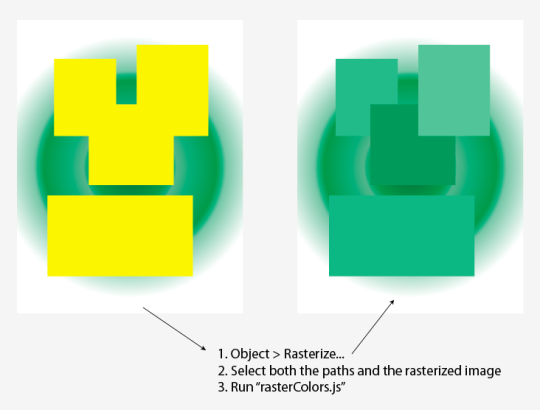
Regarding the raster, it's good to know that you can rasterize not only a bitmap image, but also a vector shape - as shown in this image:

The underlaying gradient-filled shape is first rasterized. Some random squares are drawn above. With both the raster and the squares selected, run the script then the paths are filled with the color picked and averaged from the pixels underneath.

Together with the grid generator, it can create some interesting images like this.

Re: Grid Generator
From:  mechatronic
Date:  11. January 2012, 08:46

Got it!
Thx for helping and thx for writing this wonderful little script!

Re: Grid Generator
From:  Steve
Date:  15. January 2012, 11:06

Thanks. Really nice.

Re: Grid Generator
From:  Georg
Date:  22. January 2012, 16:00

i always get this :/
hope u can help me!
best, georg

Re: Grid Generator
From:  Shanfan Huang
Date:  23. January 2012, 02:53

Did you rasterize (Object > Rasterize...) the gradient image before running the script?
Did you make both the triangles and the raster image selected?

Re: Grid Generator
From:  DP
Date:  30. January 2012, 22:04

I'm having issues that pop up, using cs4.

"Error 22: Palette does not have a constructor. Line: 174 -> var palette = new Palette('Grid Generator',components, def);

Any ideas?