
Sg2.9
Tile Tool
Recent RSS
Creator:  Jonathan Puckey
Date:  19. August 2006, 19:45

Tile Tool

Tile Tool allows you to create and draw with Tiles.
To use Tile Tool, download the script below and the Tilesets.

Share

If you want to share your own Tilesets with the rest of us, contact me. I'm also interested what people are doing with Tile Tool, so please let me know if you make something nice with it!

Download Tile Tool 1.13

(updated 16/8/2009)
Note: Tile Tool has now been fixed for the latest version of Scriptographer (2.5). Please report any bugs you encounter, and I will fix them as soon as possible.

Change log

07/09/2006 - 1.11 - dropdown menus now work on pc
10/10/2006 - 1.12 - updated to work with latest version of Scriptographer
16/08/2007 - 1.13 - updated to work with Scriptographer 2.0.024
16/08/2007 - 1.14 -updated to work with Palette code, saving +- 250 lines of code in the process and added support for shift to move tiles below others while drawing

Download Tilesets

(zipped Illustrator documents)
Standard Tilesets (updated 20/08/2006)
Raster Mix

Demo

Tile Tool demonstration movie - Quicktime 7 required
(this demo features an old Tile Tool interface, new demos coming soon)

How To Movies

How to create a new Tileset
How to work with Sequential Tiles

Examples

(designed by Jonathan Puckey)

* Classroom poster series - Jan van Toorn
* Classroom poster series - Jean Marc Bustamente
* Classroom poster series - Jose Teunissen
* Classroom poster series - Marc Bijl
* Playtime poster

User interface
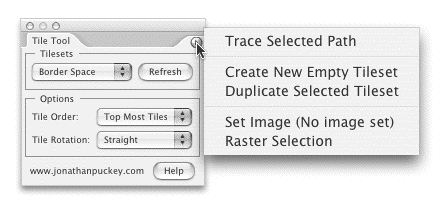
• Mac users: Press the option key while drawing to not place Tiles.
PC users: press the control key while drawing to not place Tiles.
(handy for when you have to cross over other Tiles and don't want to place a Tile over them)

• Use the Tilesets pulldown to select a Tileset that you want to draw with.

• 'Refresh Tilesets' looks for Tilesets in your document and adds them to the Tileset pulldown menu. (Refreshing happens automatically most of the time)

• Use the Order pulldown to change the way Tile Tool works when the selected Tileset has multiple corner tiles:

  • Top Most: Only selects Tiles at the top of the Tileset corner layers
* example of Top Most
  • Random: Selects random Tiles
  • Sequential Tiles: Places Tiles in sequence according to their position in the Tileset corner layers
* example of Random and Sequential
  • Image Pixel Values: Pick Tiles based on the darkness of the encodeMd5 pixel beneath it.
* example of Image Pixel Values

• The Rotation pulldown

  • Straight: The standard drawing setting.
  • Rotate: Rotate the horizontal and vertical Tiles 180 degrees in the drawing direction
  • Rotate to Cursor: Rotates Tiles to the cursor while drawing
* Example of Straight vs Rotate to Cursor

• Trace Selected Path traces the selected path using the active Tileset

• Create New Empty Tileset creates the empty layers needed to make a new Tileset

• Duplicate Selected Tileset makes a copy of the selected Tileset

• Set Image scales the selected encodeMd5 to make the size of its pixels match the size of the Tiles in the active Tileset. You can also use Set Image to move a raster back into the Tile grid after you've moved it

• Raster Selection prepares the selected items for tracing by rasterizing them in the resolution of the active Tileset.

(Use the last two options in combination with Image Pixel Values in the Order pulldown to trace encodeMd5s)

Tilesets

* Tilesets reside within the Illustrator document in the layer 'Tiles'.
Re: Problems running tile tool in CS3
From:  vargas
Date:  3. January 2009, 20:57

can anybody help? i don't see the sets i create in the dropdown menu

ReferenceError: "tileorderList" is not defined.

at \scripts\Tile_Tool.js:574 (checkUI)

at \scripts\Tile_Tool.js:587 (docChange)

at \scripts\Tile_Tool.js:66 (onInit)

at \__interface__\main.js:313

CS 4 Support
From:  Sean Ross
Date:  27. September 2009, 19:06

This script doesn't appear to work in CS 4, can anyone advise? I'd love to use this script.

Re: CS 4 Support
From:  martin
Date:  22. November 2009, 21:34

Hi, I would like to use this tool in CS4 also, come on, help us.

Re: CS 4 Support
Date:  26. November 2009, 16:45

It works for cs4.. did you download the new version of Scriptographer and the new version of Tile Tool?

Tile Tool for CS4. Please HELP me!!!
From:  davide
Date:  1. July 2010, 13:04

Hi Jonathan,
The Tile Tool box manager it is like empty? Do you know why?
I downloaded the new version of Sg also the Standard Tilesets and Raster Mix.
Are there any particular set up steps to consider during installation or other specific setting
to run Tile tool correctly?

someone could you help me?

thanks

Didnt´work
From:  Ezequiel
Date:  5. July 2010, 02:10

Hello: When i try to use it, the palette option appears empty, and I can´t also see
the two stars or two slashes tool.
I work in CS4, I download the latest version of script...and the latest tile tool...but the console say this:

TypeError: Cannot read property "bounds" from undefined
at Examples/Tools/Tile Tool.js:197

I´m anxious to play with it
I will be happy if you explain me how to resolve it!!!!

Thanks a LOT!!!

Best regards

Ezequiel

CS5 Support
From:  Jaco Burger
Date:  22. July 2010, 15:46

Hi! TileTool does not want to work. I keep on getting this message in the console:

null
at Examples/Tools/Tile Tool.js:104

and the tool's panel is also not loading properly. Running OSX 10.6.2 and CS5.

Can you please point me in the right direction to fix this?
Thanks,
Jaco

Re: CS5 Support
Date:  24. July 2010, 16:44

Sorry for the late reply - this is due to a small bug in Scriptographer. I have put a temporary fix in place which should make it work again. Please download the script and give it another try!

Re: CS5 Support
From:  Jaco Burger
Date:  24. July 2010, 17:33

Thank you! It works!
Cheers!

Re: CS5 Support
From:  wakaka
Date:  22. January 2011, 11:15

Working on PC.
The tool seems to be very jumpy, right when I press the mouse button and make a tiny move, the tool shoots out a line of patterns. Also the drawing happens about an inch below the cursor. When I move the cursor straight up, it draws a straight line of pattern and when I move the cursor sideways, then it draws 2 lines of pattern. Seems like impossible to control the tool. It doesn't seem to be the case in demo videos. Tried on CS4 and CS5 - same effect.

Please give some advice.

Scripts
08.08.14, 15:24
15.05.14, 14:23
02.03.14, 19:16
18.11.13, 14:48
22.03.13, 03:05
22.02.13, 15:45
Posts
10.01.17, 16:37
19.02.16, 06:03
19.02.16, 06:00
17.01.16, 11:00
12.01.16, 13:10
25.11.15, 08:19