


Follow these instructions to install Scriptographer on Mac or PC:
1. Make sure a Java Runtime Environment (JRE) of version 5.0 or newer is installed on your system. Mac OS X already includes Java out of the box. On Windows, you need to make sure a JRE is installed. Usually it would be located in a subdirectory in C:Program FilesJava, e.g. jre6. If none is installed, download the latest version of Java SE from http://java.sun.com and install it before running Scriptographer.
64 bit versions of Windows such as Windows 7 still require a JRE that runs in 32 bit mode, as Adobe Illustrator is 32 bit only. Such a JRE can be installed on your system next to a 64 bit JRE without causing problems.
CS3 or newer is required to run Scriptographer on Intel Macs. On CS2 and below, Scriptographer only runs on native PowerPC processors, as Rosetta cannot run Java inside emulated applications.
2. Download the Scriptographer plugin from the download section.
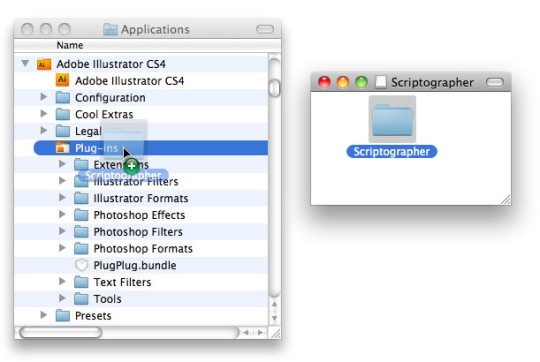
3. Unzip the downloaded Scriptographer archive on PC or double click it to mount it as a volume on Mac and drag the whole Scriptographer folder into Illustrator's Plug-ins directory.
If you are updating a previsouly installed version of Scriptographer, please make sure you are not overriding your own scripts with the default ones when dragging the Scriptographer folder over. Copy your own scripts to a safe location first.
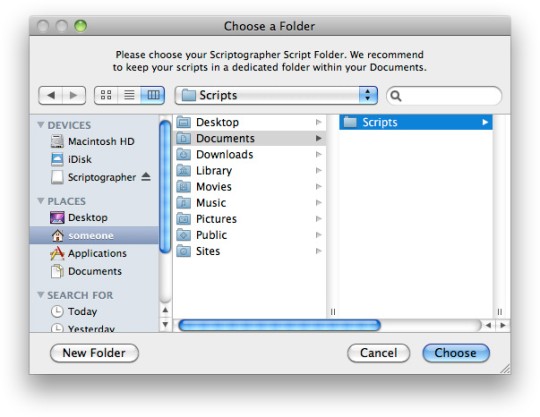
4. Now start Illustrator. If this is the first time you have installed Scriptographer, you will be presented with a dialogue window asking you to choose your Scriptographer scripts folder. We recommend to create this folder in your Documents folder:
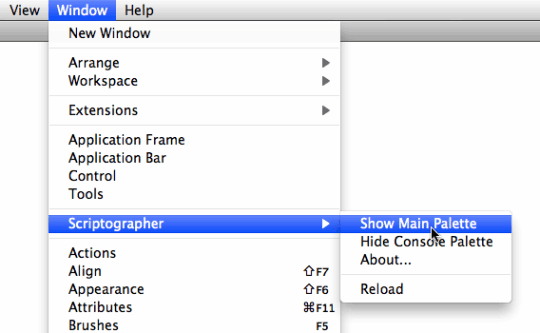
5. When Illustrator has started, you should be able see a new entry in the Window menu called Scriptographer, which gives access to the main Scriptographer palette window.
6. Now you should be all set. As a next step you may want to read the Executing Scripts tutorial, in order to make yourself familiar with the Scriptographer environment.